-
[5주차]스파르타코딩클럽 웹개발 종합반 1카테고리 없음 2022. 10. 25. 14:33
5-1
본격적으로 들어가기 전에 파일질라 설치를 하고 가비아 회원가입 및 도메인을 만들었다.
5-2
buket 폴더에 새 프로젝트를 만든 후 폴더 세팅, index.html, app,py 파일을 만들고 인터프리터를 설치했다.
5-3
버킷리스트 app.py와 index.html를 복붙했다.. ㅋㅋㅋ
5-4 [버킷리스트] - POST 연습(기록하기)
이전에 했던 것들이랑 비슷하게 코드를 짜준다!
근데 처음 보는 함수가 생겼다 len()
버킷리스트에서 번호와 완료여부를 보고 체크 할 수 있어야 해서 리스트의 요소 개수를 구할 수 있는 len() 함수가 들어갔다
그리고 doc 안에 넘버를 알 수 있게 num = 0 이 추가되었고 완료 여부도 알 수 있게 done = 0 도 추가됬다.
@app.route("/bucket", methods=["POST"])
def bucket_post():
    bucket_receive = request.form['bucket_give']

    bucket_list = list(db.bucket.find({}, {'_id': False}))
    count = len(bucket_list) + 1

    doc = {
        'num' : 0,
        'bucket' : bucket_receive ,
        'done' : 0
    }
    db.bucket.insert_one(doc)

    return jsonify({'msg': '등록 완료!'})
index.html는 이전과 정말 다른게 없어서 금방 끝났다.
function save_bucket(){
    let bucket = $('#bucket').val()
$.ajax({
type: "POST",
url: "/bucket",
data: {bucket_give:bucket},
success: function (response) {
alert(response["msg"])
    window.location.reload()
}
});
}
5-5 [버킷리스트] - GET 연습 (보여주기)
app.py 는 추가된 것 없이 전체리스트를 불러오기만 하면 되서 빠르게 끝났다.
@app.route("/bucket", methods=["GET"])
def bucket_get():
    bucket_list = list(db.bucket.find({}, {'_id': False}))
    return jsonify({'buckets':bucket_list})
index.htmi는 꽤 많이 추가됬다.
먼저 콘솔로 buckets이 잘 내려오는지 확인 해 준다.
$(document).ready(function () {
    show_bucket();
});
function show_bucket(){
    $.ajax({
        type: "GET",
        url: "/bucket",
        data: {},
        success: function (response) {
            console.log(response['buckets'])
        }
    });
}
검사로 확인 했더니 bucket : '버킷리스트' , done 0 , num 1 이 출력된다. bucket, done , num을 이용하면 될 것 같다.
function show_bucket(){
$.ajax({
type: "GET",
url: "/bucket",
data: {},
success: function (response) {
    let rows = response['buckets']
    for (let i =0 ; rows.length ; i++){
        let bucket = rows[i]['bucket']
        let num =rows[i]['num']
        let done = rows[i]['done']
        let temp_html = ``
그런데 버킷리스트에서 달성이 안 된 것들은 완료! 라는 버튼이 없고 달성이 된 것들은 완료! 라는 버튼이 없다.
그래서 if문을 써서 done == 0 이면 완료!라는 버튼이 같이 출력되게 만들고 0이 아니면 완료라는 버튼이 없이 출력되게 만들어 준다.
if (done == 0){
    temp_html = `<li>
    <h2>✅ ${bucket}</h2>
    <button onclick="done_bucket(${num})" type="button" class="btn btn-outline-primary">완료!</button>
    </li>`
} else { temp_html = ` <li>
    <h2 class="done">✅ ${bucket}</h2>
    </li>`}
$('#bucket-list').append(temp_html)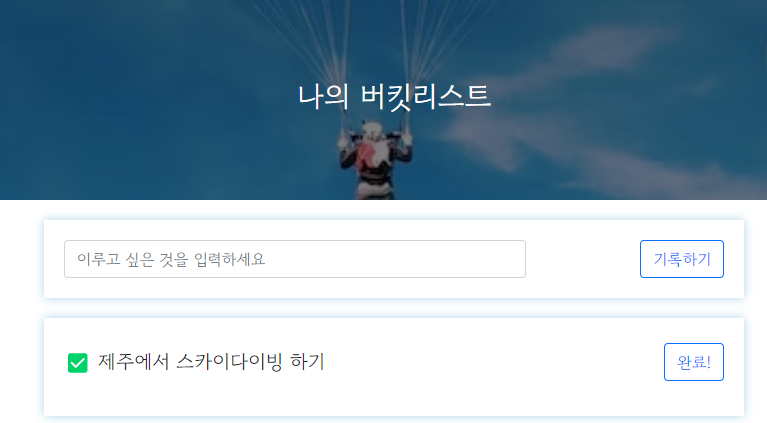
결과물 5-6 [버킷리스트] - POST연습 (완료하기)
(서버 파일)
버킷 번호를 받아서, 업데이트 하면 된다.
그런데 num_recevie는 문자열로 들어오니, 숫자로 바꿔주는 것이 좋다.
num_recevie에 int() 를 붙임으로서 숫자로 인식되게 해 줄수 있다.
db.bucket.update_one({'num': int(num_receive)}, {'$set': {'done': 1}})최종 결과물
@app.route("/bucket/done", methods=["POST"])
def bucket_done():
    num_receive = request.form['num_give']
    db.bucket.update_one({'num': int(num_receive)}, {'$set': {'done': 1}})
    return jsonify({'msg': '버킷 완료!'})
(클라이언트 파일)
버킷 넘버를 보여주면 된다. 버킷넘버는 HTML이 만들어질 때 적히게 된다.
data: {num_give:num},최종 결과물
function done_bucket(num){
$.ajax({
type: "POST",
url: "/bucket/done",
data: {num_give:num},
success: function (response) {
alert(response["msg"])
    window.location.reload()
}
});
}
이렇게 해서 버킷리스트 프로젝트가 끝이났다.
이건 좀 많이 어려워서 복습떄 제대로 연습 해 봐야 할 것 같다 ㅠㅠ